
UdaCam1.2 - App Store
You'll be able to see results in few seconds.
Publisher Description
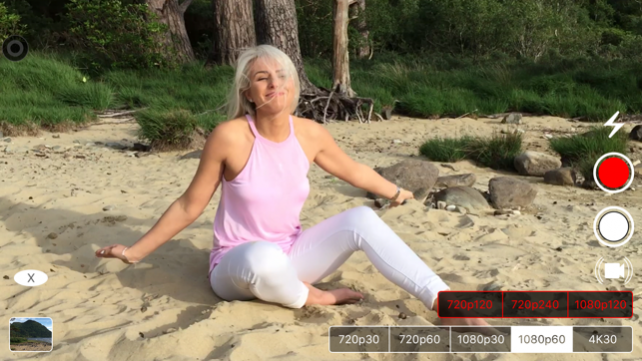


There's a time and a place for 1080p30.
There's a time and a place for 1080p60.
There's a time and a place for 4K.
But taking the time to switch between them?
"Ain't nobody got time for that".
UdaCam let's you switch recording settings(resolution and frames per second) seamlessly in app so you can capture video precisely as intended.
Features:
• Launch from Notification Center using the UdaCam Today Widget or using your favourite launcher app.
• Switch recording settings in app.
• Toggle video stabilization when using a tripod for full field of view.
• Vertical zoom slider in all orientations.
• Swipe left or right for left handed or right handed use.
• Swipe up or down to adjust exposure.
• Double tap to activate continuous auto focus and continuous auto exposure.
• Snap 16:9 images.
• Quickly view your captures.
• Camera location view
• Copy your pics or videos to your favourite apps for viewing, editing or storage.
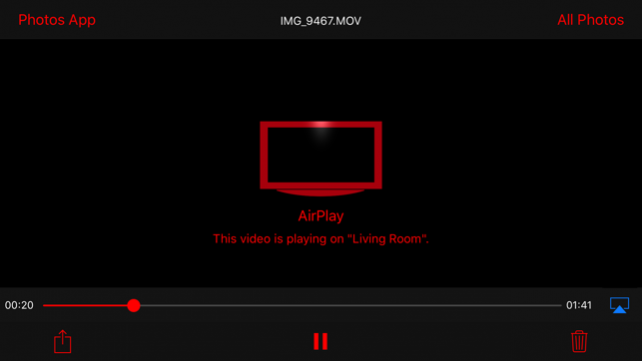
• Airplay video to Apple TV.
• 3D Touch Quick Actions.
You can use the following URL's with your favourite launcher app...
UdaCam://4K30, UdaCam://1080p60, UdaCam://1080p30, UdaCam://720p60, UdaCam://720p30, UdaCam://1080p120, UdaCam://720p240, UdaCam://720p120
For feedback and support please contact udacamfeedback@gmail.com
May 26, 2017 Version 1.2
+ Added ability to lock interface rotation when viewing your recordings.
+ Added ability to lock exposure whilst still allowing tap to focus.
+ Performance and stability improvements.
Thanks for using UdaCam! If you could make some time to leave a review it would be greatly appreciated..
About UdaCam
The company that develops UdaCam is James Roche. The latest version released by its developer is 1.2.
To install UdaCam on your iOS device, just click the green Continue To App button above to start the installation process. The app is listed on our website since 2017-05-26 and was downloaded 0 times. We have already checked if the download link is safe, however for your own protection we recommend that you scan the downloaded app with your antivirus. Your antivirus may detect the UdaCam as malware if the download link is broken.
How to install UdaCam on your iOS device:
- Click on the Continue To App button on our website. This will redirect you to the App Store.
- Once the UdaCam is shown in the iTunes listing of your iOS device, you can start its download and installation. Tap on the GET button to the right of the app to start downloading it.
- If you are not logged-in the iOS appstore app, you'll be prompted for your your Apple ID and/or password.
- After UdaCam is downloaded, you'll see an INSTALL button to the right. Tap on it to start the actual installation of the iOS app.
- Once installation is finished you can tap on the OPEN button to start it. Its icon will also be added to your device home screen.
Program Details
System requirements
Download information
Pricing
Version History
version 1.2
posted on 2017-05-26
May 26, 2017 Version 1.2
+ Added ability to lock interface rotation when viewing your recordings.
+ Added ability to lock exposure whilst still allowing tap to focus.
+ Performance and stability improvements.
Thanks for using UdaCam! If you could make some time to leave a review it would be greatly appreciated..
version 1.1
posted on 2016-09-12
version 1.2
posted on 1970-01-01
2017年5月26日 Version 1.2
+ Added ability to lock interface rotation when viewing your recordings.
+ Added ability to lock exposure whilst still allowing tap to focus.
+ Performance and stability improvements.
Thanks for using UdaCam! If you could make some time to leave a review it would be greatly appreciated..
Disclaimer
Official App Store Link
We do not host UdaCam on our servers. We did not scan it for viruses, adware, spyware or other type of malware. This app is hosted by Apple and passed their terms and conditions to be listed there. We recommend caution when installing it.
The App Store link for UdaCam is provided to you by apps112.com without any warranties, representations or guarantees of any kind, so access it at your own risk.
If you have questions regarding this particular app contact the publisher directly. For questions about the functionalities of apps112.com contact us.
